


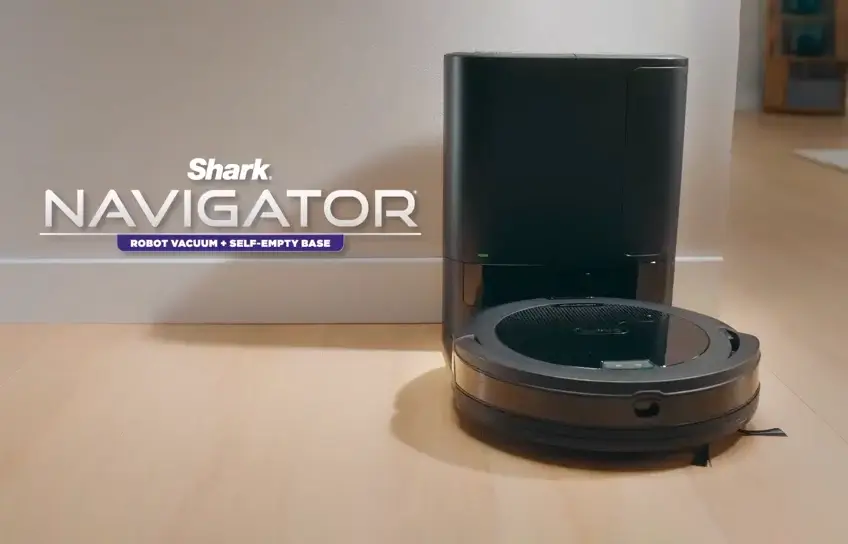
Robot vacuums have come a long way from the days of bumping aimlessly into furniture. Today, the shark navigator robot vacuum stands as one of the more talked-about options in the mid-range category, drawing attention for its structured navigation system and pet hair performance. But talk is cheap. What you really want to know is how it holds up in real-world testing and whether the price tag makes sense for what you get.
This review pulls from lab tests, verified buyer feedback, and detailed expert analysis to give you an honest, clear picture of exactly what this machine does well, where it falls short, and who it actually makes sense for.
Shark Navigator Robot Vacuum Full Specifications
Before getting into performance details, here is a quick look at the confirmed technical specs for the Shark Navigator RV2110, pulled directly from Shark’s official product page and verified retail listings.
| Specification | Details |
| Model Number | RV2110 |
| Navigation System | SmartPath Navigation with Spot LiDAR Technology |
| Cleaning Pattern | Row-by-row (structured path) |
| Suction Power | Up to 50% more suction vs. iRobot Combo Essential |
| Battery Runtime | Approximately 60 minutes |
| Recharge and Resume | Yes |
| Brushroll Type | Self-cleaning, anti-hair wrap |
| Obstacle Detection | Yes (basic object avoidance) |
| Robot Diameter | 12 inches |
| Connectivity | Wi-Fi, SharkClean App, Amazon Alexa, Google Assistant |
| Voice Control | Yes (Alexa and Google Assistant) |
| Auto-Empty Option | Available separately (RV2120AE, 60-day bagless base) |
| Floor Compatibility | Carpets and hard floors (hardwood, tile, laminate) |
| Color | Steel Grey |
| Included Accessories | Robot unit, 2x side brushes, standard charging base |
| Retail Price (Base Model) | Approximately $322 USD |
How the Shark Navigator Robot Vacuum Navigates

SmartPath Navigation vs. Bump-and-Turn
One of the biggest differences between the Navigator and cheaper robot vacuums is how it moves around your home. Rather than bouncing randomly off walls and furniture, the Navigator uses what Shark calls SmartPath Navigation, which maps your home and cleans in an organized row-by-row pattern. This is a meaningful upgrade from the older bump-and-turn approach because it means fewer missed spots and more efficient cleaning paths overall.
The mapping is powered by spot LiDAR technology, which uses a sensor to detect and build a layout of your space. It is worth noting, however, that this is not the same as a full 360-degree LiDAR system you would find on Shark’s higher-end models like the PowerDetect series. The Navigator’s LiDAR is functional and useful for creating cleaner paths, but it is a more basic version of the technology. For a home under 1,500 to 2,000 square feet, it handles the job well. In larger homes with more complex layouts, you may notice it occasionally misses corners or requires a second pass in certain areas.
Obstacle Detection and Avoidance
The Navigator does include basic obstacle detection. It can sense and navigate around objects sitting on the floor, which means you do not need to spend time pre-tidying before every cleaning session. That said, the avoidance is not sophisticated enough to handle smaller items like charging cables, thin socks, or small pet toys. If those are lying around, there is a real chance the vacuum will attempt to suck them up or get tangled. A quick floor scan before running it will save you some frustration.
Cleaning Performance on Different Surfaces

Hard Floors
On hard floors like hardwood, tile, and laminate, the Navigator performs solidly. The self-cleaning brushroll does a good job picking up fine dust, debris, and pet hair without scattering particles across the room. Real user feedback from verified buyers at Home Depot and Best Buy consistently mentions strong performance on hard floors, with several pet owners noting it handles fur buildup effectively without leaving residue behind.
Carpet Cleaning
On low-pile carpet, the Navigator does a reasonable job. Shark claims up to 50 percent more suction compared to robots in its class, specifically citing comparison against the iRobot Combo Essential, though they do not publish official Pascal measurements to back that claim with precise numbers. In practice, the suction feels noticeably capable on thin to medium carpet.
On thicker or high-pile rugs, however, the performance becomes less consistent. Some users report needing to run it twice over heavily-trafficked carpet areas to get a fully clean result. If deep carpet cleaning is your primary concern, this vacuum will help but may not fully satisfy on its own.
Pet Hair Performance
This is genuinely one of the Navigator’s strongest areas. The self-cleaning brushroll is designed specifically to prevent hair from wrapping around the roller, which is one of the most common maintenance headaches with robot vacuums. Pet owners consistently praise this feature in reviews. The brushroll does not eliminate the need for occasional maintenance, but it dramatically reduces how often you need to manually pull tangled hair off the roller.
Key Features That Matter in Daily Use

Recharge and Resume
The Navigator includes a recharge-and-resume function, meaning if the battery gets low mid-clean, it will return to its dock, charge up, and then continue from where it left off. This is especially helpful in homes larger than one room or for users who want a more hands-free experience. For daily light cleaning, most users report the battery runs long enough to cover a reasonably sized living space on a single charge. Running it on the highest suction setting drains the battery faster, so eco mode works well for daily maintenance runs.
Auto-Empty Dock Options
The 2025 refresh of the Navigator series added optional self-emptying dock configurations, with 30-day and 60-day bagless capacity options. This is a meaningful addition that pushes the Navigator from a basic robot vacuum into more of a set-it-and-forget-it appliance. Both options are bagless, which keeps ongoing costs low.
App and Voice Control
All current Navigator models support the SharkClean app and are compatible with Amazon Alexa and Google Assistant. You can set cleaning schedules, start or stop sessions, and check status from your phone. The functionality is there, but it is worth being upfront: the SharkClean app has received mixed feedback from users and reviewers alike.
The core features work, but the app interface is not as polished or intuitive as some competing brands. Complaints about connectivity issues and a less-than-smooth setup process appear regularly across user reviews. It is not a dealbreaker, but if a seamless app experience is important to you, this is something to keep in mind.
What Real Buyers Are Saying
What They Love
Across verified reviews at Home Depot, Best Buy, and consumer forums, the recurring praise centers on a few consistent points. The row-by-row cleaning pattern gives users confidence that the machine is actually covering the floor methodically rather than at random. The self-cleaning brushroll earns strong marks from pet owners. And the recharge-and-resume feature is widely appreciated by people who want to set it up and not think about it.
One buyer on the Home Depot review page described it this way: the Navigator cleans in neat rows, picks up pet hair reliably, and the brushroll stays clear without constant attention. That kind of straightforward, no-fuss operation is exactly what most users are looking for in this price range.
What They Complain About
The most commonly cited negatives are consistent across platforms. The app experience is the top complaint, with users flagging connectivity hiccups and a setup process that takes more patience than it should. The vacuum is also on the louder side compared to some competitors, though most users say it is not disruptive enough to be a real problem.
On the base model without the auto-empty dock, you do have to manually empty the dustbin yourself after each run, which some buyers find inconvenient. And as mentioned, on high-pile or thick carpet, cleaning results are not always thorough on the first pass.
Pros and Cons
Pros
- Self-cleaning brushroll minimizes hair wrap
- Structured row-by-row cleaning improves coverage
- Recharge & resume adds hands-free convenience
- Performs well on hard floors
- Fully bagless (no ongoing costs)
- Works with Alexa & Google Assistant
Cons
- SharkClean app can be unreliable
- Struggles on thick / high-pile carpet
- Slightly louder than some rivals
- Basic obstacle avoidance misses small items
- Manual bin emptying on base model
- No mopping feature
Who Should Buy the Shark Navigator Robot Vacuum

This vacuum makes the most sense for someone who wants a reliable, structured-cleaning robot vacuum without spending premium money. It is a strong choice for homes with hard floors and low to medium pile carpet, especially households with pets. The self-cleaning brushroll alone makes it worth considering if pet hair management is a daily issue.
If you live in a large multi-level home, need advanced obstacle avoidance, or want mopping capability alongside vacuuming, the Navigator is not the right fit. Shark’s higher-tier models in the 2500 or 2800 series offer more advanced navigation, better app integration, and mopping functionality for users willing to invest more.
For the average household looking for a dependable daily cleaner that maps intelligently and handles pet hair without constant maintenance, the Shark Navigator delivers genuine value. If you want to explore it further or check current pricing, you can find it on Amazon, Best Buy, Home Depot, and Target. Prices and bundle options with the auto-empty dock vary by retailer, so it is worth comparing before purchasing.
Final Thoughts
The Shark Navigator robot vacuum is not the most feature-rich robot on the market, and it does not pretend to be. What it does well, it does consistently: it navigates methodically, handles pet hair better than most in its class, and offers a practical set of smart features for everyday use. The app could be better, and thick carpet will challenge it, but for the majority of homes, it performs reliably without demanding much attention. That is exactly the point of a good robot vacuum.
