


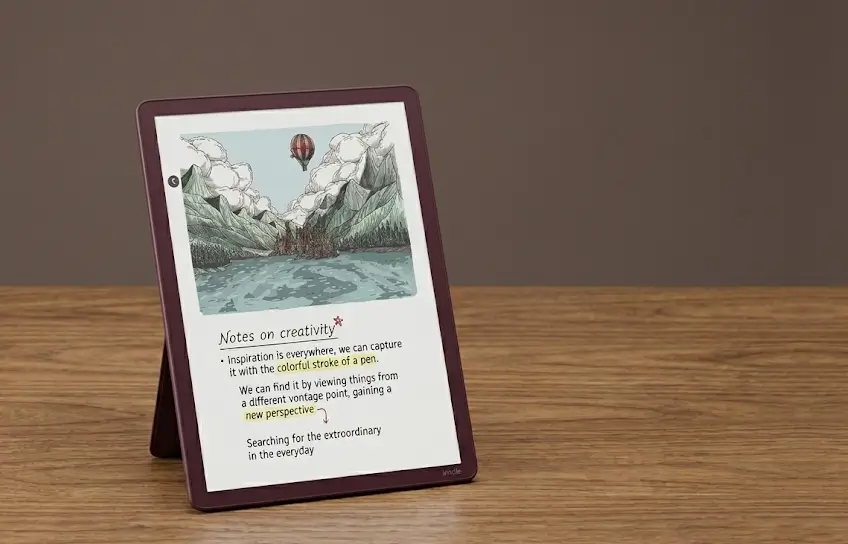
If you have been eyeing a digital notebook that actually feels like writing on paper, you have probably already heard about the Amazon Kindle Scribe Colorsoft. Released as one of the most talked-about E Ink devices of the year, the Amazon Kindle Scribe Colorsoft 2025 represents Amazon’s boldest step yet into the world of color note-taking, and it comes with a price tag to match.
Amazon has been steadily building out its lineup of smart home gadgets and productivity devices, and the Scribe Colorsoft sits firmly at the premium end of that range. At $630 for the base model, this is not an impulse buy for most people. So before you reach for your wallet, it is worth taking a good, honest look at what this device actually delivers and who it is really built for.
Amazon Kindle Scribe Colorsoft Full Specifications
| Specification | Details |
| Display | 11-inch Colorsoft E Ink (Kaleido 3), glare-free |
| Color Resolution | 150 PPI |
| B&W Resolution | 300 PPI (1980 x 2640) |
| Processor | 2GHz Quad-Core |
| RAM | 4GB |
| Storage | 32GB / 64GB |
| Thickness | 5.4mm |
| Weight | 400g (14.1 oz) |
| Connectivity | Wi-Fi 5 (802.11ac), Bluetooth 5.1 |
| Battery Life | Up to 8 weeks reading, 3 weeks writing |
| Front Light | Yes, mini LED array |
| Stylus | Included (no internal battery, 10 replacement tips) |
| Pen Colors | 10 (Black, Gray, Red, Orange, Yellow, Green, Aqua, Blue, Purple, Pink) |
| Highlighter Colors | 5 |
| Writing Tools | Pen, Fountain Pen, Marker, Pencil, Shader |
| Cloud Sync | Google Drive, Microsoft OneDrive, OneNote |
| Colors Available | Graphite, Fig |
| Price (32GB) | $629.99 |
| Price (64GB) | $679.99 |
| Release Date | December 10, 2025 |
A Fresh Design That Feels More Balanced

One of the first things you will notice when you pick up the new Scribe is how different it looks from its predecessors. Amazon finally ditched the asymmetrical design that featured a wide bezel running down one side of the device. The new version has an even bezel wrapping all the way around the 11-inch display, giving it a much cleaner and more modern appearance.
The device is only 5.4mm thick and weighs around 400 grams, which is noticeably lighter than the previous generation. That combination of thinness and weight makes it comfortable to hold for extended reading or writing sessions, even without a dedicated grip area. Many users initially worry about accidentally touching the screen while holding it, but in practice the sensitivity is well-calibrated and accidental inputs are rarely an issue.
The device comes in two color options: a classic Graphite and a warmer, purple-leaning shade called Fig. Both feel premium and understated, which suits a device meant to sit on a desk or in a bag alongside professional materials. If you are already invested in Amazon’s ecosystem and have looked into the best alexa devices for your home or office, the Scribe Colorsoft fits right into that world as the writing and reading companion that completes the picture.
The Stylus Gets a Meaningful Upgrade
The included stylus has been redesigned alongside the device itself. It is slightly thicker and more rounded than earlier versions, and the magnetic attachment to the right side of the device is impressively strong. It snaps into place with an audible click and stays there firmly enough that you can actually lift the tablet by the pen, though that is not something you would want to do on purpose.
The writing surface has a texture-molded glass finish that adds just enough resistance to mimic the feel of pen on paper. It is one of those small details that makes a meaningful difference over long writing sessions. The eraser end also feels more realistic than most stylus erasers, which is a welcome improvement for anyone who revises notes frequently. Amazon clearly put the same level of engineering care into this stylus as they have into premium audio hardware like the amazon echo studio, where fine-tuning a tactile experience makes all the difference in how much you actually enjoy using the product day to day.
The Color Display: Beautiful but Context-Dependent

This is the feature that separates the Colorsoft from the standard third-generation Scribe, and it is where the $130 premium lives. The color display offers 150 pixels per inch for color content and 300 ppi for black and white, using Kaleido 3 E Ink technology paired with Sharp’s Oxide display panel. The result is colors that are soft and slightly chalky rather than the vivid, saturated look you would get from an LCD screen. Think of it more like watercolor than neon.
You get ten pen colors to write with: Black, Gray, Red, Orange, Yellow, Green, Aqua, Blue, Purple, and Pink. They are distinct enough to be useful for color-coded note-taking, and switching between them is quick thanks to the faster refresh rate. There are also five writing tool types including a pen, fountain pen, marker, pencil, and a new shader tool that layers soft color for an almost watercolor effect.
Who Actually Benefits from the Color Screen?
Here is the honest answer: the color display makes the most sense for students, avid note-takers, and anyone who reads illustrated books like graphic novels or textbooks with color diagrams. If you spend a lot of time color-coding your notes, annotating PDFs with different highlight colors, or reading visual content, the Colorsoft genuinely improves that experience in a way that the standard Scribe simply cannot.
For someone who primarily reads novels or jots down plain text notes, the color display adds less practical value. The soft E Ink palette is not suited for photo-heavy content or graphic design work. It is best understood as a purposeful tool rather than a general-purpose color tablet. If vivid color accuracy is your primary concern, a device like the google nest hub max or a standard LCD tablet will serve that need better, but for distraction-free reading and note-taking with a touch of color, the Scribe Colorsoft holds its own in a way those screens simply cannot replicate.
Performance and Software That Have Caught Up

Under the hood, the Scribe Colorsoft runs on a new quad-core processor that delivers page turns roughly 40 percent faster than the previous generation, along with 4GB of RAM compared to the 1GB found in older models. In everyday use, this translates to a more responsive experience that rarely makes you feel like you are waiting for the device to catch up with your thoughts or your finger.
The writing latency has been brought down to under 12 milliseconds, which is low enough that most people will not consciously notice any delay between putting pen to screen and seeing the result appear. It is one of the key technical achievements that makes the Scribe feel like a credible paper replacement rather than a slow digital approximation of one.
A Home Screen That Finally Makes Sense
The redesigned home screen is a genuine improvement over the older layout. A Quick Notes section sits at the top for capturing fast thoughts, a Jump Back In section shows your five most recently opened notebooks or e-books, and your library fills in below. It is a far more intuitive layout than what came before, where navigating between sections required more taps than it should have.
The device now syncs with Google Drive and Microsoft OneDrive, making it easier to pull in PDFs for annotation and export marked-up versions back to your workflow. An AI-powered search bar indexes your handwritten notes and can surface content by topic, which proves more useful than it might sound at first. A Send to Alexa+ feature is coming in early 2026, which will allow Alexa to reference your notes and help you brainstorm or build to-do lists from them. If you already use a display device like the echo show 11 in your kitchen or office, being able to call up your Scribe notes through Alexa on that screen is the kind of cross-device workflow that makes the whole Amazon ecosystem feel genuinely connected.
Pricing and Whether the Upgrade Makes Sense
The Scribe Colorsoft starts at $630, and the amazon kindle scribe colorsoft 32gb option is the entry point most buyers will consider first, offering plenty of space for thousands of notebooks and e-books. A 64GB option is available for $50 more if you plan to store a large library or work heavily with annotated PDFs. To put that price in context, it sits above premium Amazon display devices like the amazon echo show 15, which tells you that Amazon is positioning the Scribe Colorsoft squarely as a professional productivity tool rather than a casual consumer gadget.
The standard third-generation Scribe, which offers the same performance and design without the color display, starts at $500. That $130 gap is real and worth thinking about carefully. If you are upgrading from a second-generation Scribe, it is worth noting that Amazon plans to push the new home screen interface to older devices in 2026, along with the Google Drive and OneDrive sync features.
Knowing the amazon kindle scribe colorsoft release date helps put things in perspective too: the device landed in late 2025, meaning early adopters who pick it up now will benefit from a long window of software support and future feature rollouts before the next generation arrives.
For someone coming to the Scribe fresh, or upgrading from the original first-generation model, the Colorsoft is a compelling choice if color is a meaningful part of how you organize and engage with information. If color is a nice-to-have rather than a core part of your workflow, the standard Scribe offers essentially the same experience at a lower price.
Pros and Cons
Pros
- Color E Ink display (useful for notes & PDFs)
- 12ms low writing latency
- Fast performance (4GB RAM, quicker page turns)
- Cloud sync (Google Drive, OneDrive, OneNote)
- Long battery life (up to 8 weeks)
Cons
- Expensive ($630 starting price)
- No direct writing on book pages
- Lower color resolution (150 PPI)
- No waterproof rating
Final Thoughts
The Kindle Scribe Colorsoft is a well-made, thoughtfully designed device that represents real progress in the world of E Ink note-taking. The color display is genuinely attractive and functional, the performance improvements are noticeable, and the redesigned home screen makes daily use feel smoother. The stylus writing experience is one of the best available in this category.
That said, it is an expensive device with a focused purpose. It rewards users who will actually take advantage of color in their notes and reading material. If that sounds like you, it is a purchase that will likely hold its value in your daily routine for years. If you are still unsure whether you would lean on the color features, waiting for a sale or trying the standard Scribe first would be a reasonable path forward.
