


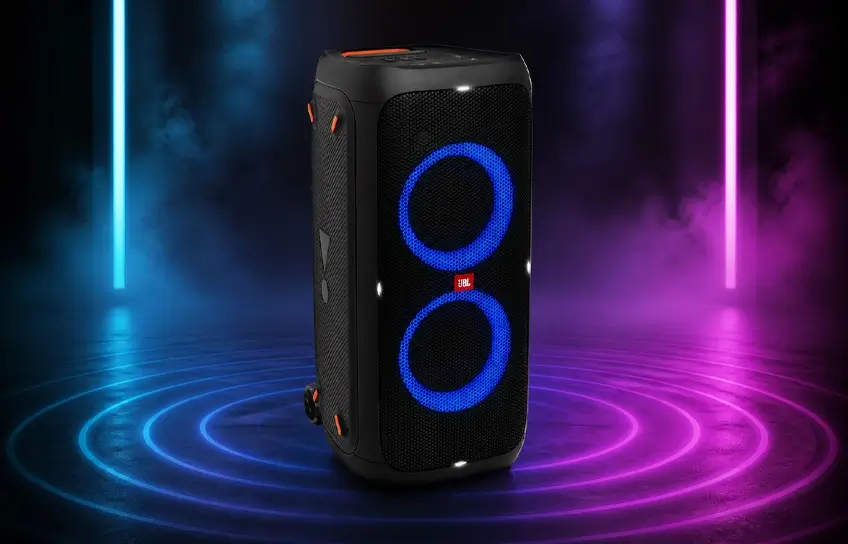
The jbl partybox 310 is a 240W transportable Bluetooth speaker built for people who need serious sound for backyard parties, beach days, and large indoor gatherings. It packs dual woofers, dual tweeters, a customizable RGB light show, microphone and guitar inputs, and up to 18 hours of battery life into a single unit that rolls on wheels like a carry-on suitcase. If you are trying to decide whether this speaker is the right fit for your needs and budget, this jbl partybox 310 review breaks down exactly what it delivers, where it holds up, and where it falls short.
Whether you are a regular host, someone who moonlights as a DJ, or simply want a speaker that can handle a crowd without being plugged into a wall all night, knowing that the jbl partybox 310 portable party speaker sits in this category helps set the right expectations before we get into the details.
JBL PartyBox 310 Specifications
Here is a full breakdown of the technical specifications so you have the exact numbers in one place before reading further.
| Specification | Details |
|---|---|
| Output Power | 240W RMS (plugged in) / 140W RMS (battery) |
| Woofers | 2 x 6.5 inch |
| Tweeters | 2 x 2.5 inch |
| Frequency Response | 45Hz to 20kHz |
| Battery Life | Up to 18 hours (at 50% volume, lights off) |
| Charge Time | Approx. 3 to 3.5 hours (AC) |
| Dimensions | 325.6 x 367.8 x 687.7 mm |
| Weight | 17.1 kg |
| Bluetooth Codec | SBC |
| Water Resistance | IPX4 |
| Inputs | AUX (3.5mm), USB-A, Dual Mic / Guitar (6.5mm) |
| Connectivity | Bluetooth, TWS Stereo Pair, Audio In/Out |
| Power Supply | AC 240V / DC 12V (adapter sold separately) |
| USB Power Bank | 5V / 2.7A output |
| Light Show | Dual RGB rings, app-controlled |
| App Support | JBL PartyBox App (iOS and Android) |
| Orientation | Vertical or Horizontal |
First Look and Build Quality

The build has a matte all-black finish with minimal branding, a solid metal front grille, and a plastic body that feels sturdy rather than hollow. It is designed to take the kind of handling that comes with regular transport and outdoor use. You can stand it vertically for maximum projection or lay it on its side horizontally, and the chassis holds up well in either orientation.
One of the most practical upgrades over its predecessor is the built-in retractable handle and smooth-rolling wheels at the base. At 17.1 kilograms, the JBL PartyBox 310 is substantial. The suitcase-style wheels make it easy to roll from your car to the party area. JBL also gave it an IPX4 water resistance rating, so light splashes and rain will not cause damage. It handles poolside and beach use fine, but keep it out of heavy downpours.
The Light Show That Comes With It
Two circular RGB rings sit around the woofers and cycle through colors, pulse animations, and strobe patterns. You control them from the top panel button or through the PartyBox app. There you can select a specific color, lock in an animation style, or toggle the strobe independently.
The rings are bright enough to be visible in most indoor settings and respond to the music, which makes them a genuinely functional part of the atmosphere rather than just a static decoration.
Sound Performance

The JBL PartyBox 310 pushes 240 watts through two 6.5-inch woofers and two 2.5-inch tweeters, enough to fill a large backyard without straining. Its frequency response runs from 45Hz to 20kHz, covering deep bass, clear mids, and detailed highs. That balance means it sounds full rather than just loud.
Out of the box, the sound signature is warm and bass-forward, ideal for hip hop, electronic music, and pop. Vocals stay present even at high volumes, and the highs keep instruments from sounding flat. The one honest limitation is at absolute maximum volume, where the low end loses some control and sounds muddy. For most real-world use below that ceiling, the audio quality is solid and consistent.
EQ Controls and the Bass Boost Feature
The top panel gives you physical controls for bass, treble, and Echo, though it is worth knowing that these controls are specifically tied to the microphone input and not the main music output. For music, the key adjustment is the Bass Boost button, which has two levels. Level one adds a noticeable punch to the mid-bass range and works well for indoor settings.
Level two is more aggressive, pushing harder low-end output that carries better across open outdoor spaces. Both boost levels will draw more from the battery, so it is worth being mindful of that if you are running on battery for a longer session.
There is also a rear passive bass radiator that reflects low-end energy off whatever surface sits behind the speaker. Placing it against a wall or solid fence rather than in open space will give you noticeably stronger bass without needing to touch any settings.
Battery Life and Charging

The JBL PartyBox 310 is rated at up to 18 hours of battery life. That figure assumes 50 percent volume with lights and bass boost off. In realistic party conditions, RGB lights on, bass boost at level one, volume at 75 to 80 percent, expect around 5 to 6 hours of playback.
Pushing to full volume with all features active brings that down to around 4 hours. Running it plugged into an AC outlet eliminates battery concerns entirely and also unlocks the full 240W output instead of the 140W you get on battery.
Charging through the AC port takes approximately three to three and a half hours from empty. A 12-volt DC port supports car charging, though the adapter is sold separately, worth noting if you plan to use it at remote outdoor locations. The USB-A port outputs 5V at 2.7A. That means the speaker doubles as a power bank, keeping your phone charged through a long session.
Connectivity and Extra Features

Bluetooth is the primary connection method, supporting two paired devices at once. That means two people can queue tracks without any handoff friction. Wired options include a 3.5mm AUX input, a USB-A port for flash drives, and dedicated audio in and out ports for daisy-chaining multiple units.
For full stereo, you can wirelessly link two PartyBox 310 units in True Wireless Stereo mode, assigning them dedicated left and right channels for a noticeably wider sound field.
Karaoke Mode and Live Performance Use
Two 6.5mm inputs on the back panel accept a microphone and a guitar. Both microphone inputs run simultaneously, making duets straightforward. The echo and gain dials adjust the microphone signal independently from the music. For additional fine-tuning, the karaoke controls in the PartyBox app handle it without touching the hardware.
The JBL PartyBox 310 typically costs between $500 and $700 depending on retailer and region. At that price, the built-in karaoke system and guitar amplifier represent value most competitors do not offer. A microphone is not bundled in the box, so the JBL PBM100 is a commonly used match for this setup.
Who Is This Speaker Actually For
This speaker is built for regular hosts who need dependable, high-volume sound for spaces up to around 400 square meters. That covers most backyards, medium-sized indoor venues, beach setups, and rooftop gatherings. It is not a replacement for a professional PA rig at large events where a crowd of several hundred people needs coverage, but for personal and semi-professional use it handles the job without compromise.
Most people overlook the three sound effect buttons on the top panel. These let you trigger DJ-style audio samples mid-session. You can also swap which samples are assigned to each button through the PartyBox app. For anyone hosting regularly or doing informal DJ sets, this turns the speaker into a performance tool rather than a simple playback device. Add the mic inputs and stereo linking, and this speaker covers use cases most portable speakers at this price do not.
Pros and Cons
Pros
- 240W output fills large outdoor and indoor spaces confidently
- Up to 18 hours of battery life at moderate settings
- Wheels and retractable handle make solo transport practical
- Dual mic and guitar inputs built in, no extra hardware needed
- RGB light show is app-controlled with full color and animation options
- IPX4 rated for poolside and beach use
- TWS stereo pairing with a second PartyBox 310 for left/right channels
- USB port outputs power to charge phones and devices mid-session
Cons
- 17.1 kg is still heavy for users without help or a vehicle nearby
- Car charging adapter sold separately, not included in the box
- Low end loses clarity and sounds muddy at maximum volume
- Bass, treble, and echo panel controls only affect the mic, not the music
- SBC-only Bluetooth codec causes noticeable latency when streaming video
- Wireless pairing is limited to another PartyBox 310 only, no cross-model support
Final Thoughts
At its price point, this speaker combines volume, portability, battery life, and extra features in a way that is genuinely hard to match. The build quality is solid and the sound holds up at volumes a real party demands. The wheels and handle make it easy to move around. The light show adds a fun visual element, and the mic and guitar inputs open up possibilities well beyond standard music playback.
If you take hosting seriously, this speaker is worth it. It keeps up with the energy of any gathering without getting lost in the background noise. It is loud when it needs to be, flexible enough for multiple purposes, and built to go wherever the party takes you.
