


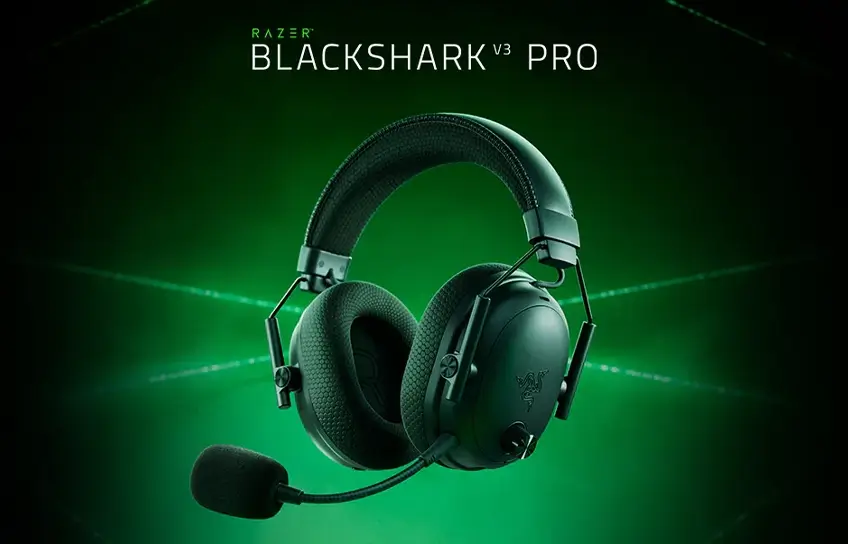
I have a bad habit of buying mid-range gaming headsets and convincing myself they are good enough. Forty dollars here, eighty dollars there, always something that works but never something that impresses. When the Razer BlackShark V3 Pro landed on my desk at $249.99, I was genuinely skeptical. That is a real amount of money for a headset, and I have heard plenty of brands charge premium prices for incremental upgrades dressed up in marketing language.
So I spent three weeks with it. Daily gaming sessions, late nights, a few long weekends where the headset barely came off my head. What I found surprised me in a few ways, frustrated me in one specific way, and ultimately changed how I think about what a gaming headset should do.
Before I get into all of that, if you are still figuring out where this fits in the broader market, our full gaming headphone breakdown puts the V3 Pro in context alongside options at every price point.
Razer BlackShark V3 Pro Quick Specs
| Spec | Details |
| Price | $249.99 |
| Drivers | 50mm TriForce Bio-Cellulose |
| Wireless | 2.4GHz HyperSpeed Gen-2 + Bluetooth 5.3 |
| Latency | 10ms (2.4GHz) |
| Battery | 70 hours (ANC off) / ~40 hours (ANC on) |
| Microphone | 12mm detachable, 48kHz |
| ANC | Hybrid, 4 microphones |
| Weight | 367g |
| Charging | USB-C |
| Platforms | PC, PS5, Xbox (variant), Switch, Mobile |
First Impressions

The box opens cleanly and everything inside feels considered. You get the headset, the HyperSpeed Gen-2 dongle with its USB-C cable, a detachable boom mic, a braided USB-C charging cable, and a 3.5mm cable with USB-C adapter. Nothing feels like filler padding the unboxing experience.
Picking up the V3 Pro for the first time, the weight registers immediately. At 367g it is not heavy by any stretch, but it is not featherlight either. The metal yoke arms that connect the earcups to the headband feel solid and purposeful, like something built to last rather than built to look good in a product photo.
The design follows the aviation headset silhouette the BlackShark line has always used. Oval earcups, thin metal frame, a clean matte finish with no RGB lighting fighting for attention. I have the black version and it genuinely looks professional. Nothing about it screams gaming peripheral in the way that makes you self-conscious wearing it somewhere other than your desk.
The memory foam headband cushion is thick. Thicker than I expected. Combined with the flowknit fabric on the inside of the earcups, the first thing I noticed putting it on was that my ears did not feel compressed or hot. That sounds like a low bar but it is actually one of the first things I noticed after years of leatherette cups that trap heat after twenty minutes.
Controls are spread across both earcups. Left side has the volume knob, power button, mic mute, USB-C port, and the 3.5mm microphone jack. Right side has the ANC button, a profile switch that also handles connection mode, and a customizable roller. Six controls in total. The volume knob is textured and easy to find by feel. The other buttons are the same shape and size, which means the first week involves some accidental wrong presses while your fingers learn the layout. That is a real annoyance. After ten days it becomes second nature, but Razer could have made the buttons more distinct.
Comfort

I will be straight with you. Comfort is what I expected to be fine and unremarkable. It turned out to be one of the V3 Pro’s strongest arguments.
I gamed in a single session for a little over five hours during a long weekend. No headaches. No sore spots. I never once pulled the headset off because something was pressing wrong. For reference, my previous headset, which cost half as much, regularly reminded me it was on my head after about ninety minutes.
The combination of the thick headband cushion and the breathable fabric earcup lining is what does it. Full leatherette creates a sealed, warm environment around your ears. The V3 Pro’s fabric inner surface lets air move. During summer gaming sessions or intense play, that difference is real. My ears stayed noticeably cooler compared to every leatherette headset I have used.
One honest note about the yoke design: the earcups sit within the metal yoke arms and can feel slightly loose when you shift the headset around on your head. This does not affect comfort during a static gaming session. It does occasionally break the seal around your ears when you look down or lean back, which matters for ANC performance. I will come back to that.
The 15-degree swivel on each earcup helps the headset conform to your head shape rather than forcing your head to conform to the headset. It is a small thing that makes a noticeable difference for anyone whose head does not match the generic average these things are usually designed for. A few people I know with larger heads have tried the V3 Pro and every single one of them mentioned the fit specifically.
Sound Quality

This is the part I want to spend the most time on because it is where the V3 Pro makes its real case.
I play a lot of Counter-Strike 2. I know the maps well enough that I can tell you where someone is from a footstep before I see them. Or at least I thought I could. The first session with the V3 Pro on a match in Mirage, I heard an enemy pushing short with careful, deliberate steps and knew from the pace and direction that they were hugging the wall rather than rushing. I called it to my teammates. I was right. That kind of resolution in positional audio is not something I was getting from my previous headset.
In Cyberpunk 2077, I was doing a stealth approach in a building I had cleared before on a different headset. With the V3 Pro I could hear a guard’s radio crackling faintly two rooms ahead and caught the sound of his boot scuff as he turned. Neither of those sounds had registered before. The game was telling me exactly where he was and I was only now hearing it clearly enough to act on it.
That is the 50mm TriForce Bio-Cellulose drivers doing their job. Razer splits the driver into three zones handling bass, mids, and treble separately. In practice what that means is sounds do not blur together into one wall of audio. A distant gunshot sounds distant. A near footstep sounds near. The game communicates more information to you and you actually receive it.
THX 7.1 Spatial Audio on PC adds another layer. In open-world games and story titles with proper multi-channel audio mixing, it makes the sound feel genuinely three-dimensional. I tested it in Horizon Forbidden West and the difference between THX on and off is not subtle. In competitive games like CS2 and Valorant, I actually turn THX off. The games’ own audio engines handle directional sound well in stereo, and adding virtual surround processing on top can smear the precision you actually want. Test both in your main game and decide for yourself.
Now the honest part. The default tuning has a sharpness in the upper treble that becomes obvious in certain situations. Breaking glass, metal-on-metal sounds, sharp cymbal hits in music, they can tip from crisp into harsh at higher volumes. It is not constant and it is not terrible, but it is there. A small EQ adjustment through the Razer Audio app fixes it within five minutes. Cut the 4kHz band slightly, lift the 500Hz and 2kHz ranges a touch, and the sound becomes significantly more balanced. The app’s custom EQ is genuinely useful and I spent time dialing it in during the second week of testing.
For music, the V3 Pro is enjoyable but not its best self. I listened to a lot of metal and electronic during testing. The detail is there and the soundstage is wider than I expected from a gaming headset. But if you want deep, heavy bass that physically moves you, this headset does not go there. The low end is present and clean but not enveloping. If music listening matters as much as gaming to you, there are better tools for that specific job.
EQ starting points by game type:
| Game Type | Where to Start | What You Are Adjusting For |
| FPS (CS2, Valorant, Warzone) | FPS preset in Razer Synapse | Lifts 2 to 4kHz for footstep and cue clarity |
| Battle Royale (Apex, PUBG) | Custom: small boost at 200Hz | Environmental audio balance with positional cues |
| RPG and open world | Default balanced | Clean low-end without losing dialogue |
| Music | Flat EQ, THX off | Removes gaming coloring for a more neutral response |
Active Noise Cancellation

ANC is new to the BlackShark line with the V3 Pro and I was curious how Razer would handle it given one specific design tension: the fabric earcup lining.
The way ANC works is it uses microphones to detect incoming noise and generates an opposing frequency to cancel it. But the effectiveness of that process depends heavily on how well your earcups physically block sound before the electronics even kick in. Leatherette creates a tighter, more consistent seal. Fabric breathes, which is great for comfort, but means the passive isolation baseline is lower.
I work from home and my setup is near an HVAC unit. With ANC on, the constant low hum from that unit disappears. Traffic noise from outside drops noticeably. The hum of my PC fans becomes inaudible. For that category of steady, low-frequency background noise, the V3 Pro’s ANC does exactly what you want.
Where it struggles is with sharper, unpredictable noise. My flatmate talking in the next room is muffled but not gone. A door slamming registers. A phone ringing cuts through. If you are gaming in a busy household expecting ANC to create complete silence, it will not do that.
The loose yoke fit I mentioned in the comfort section compounds this. On two occasions during testing, the earcup shifted slightly while I was leaning back and the ANC effectiveness dropped noticeably because the seal broke. Pushing the cups back into position while holding the yoke fixed it. It is a real-world issue that the spec sheet does not warn you about.
Ambient mode, which pipes environmental audio in deliberately, is more useful than I expected. Gaming at home while needing to hear the door or catch a conversation, you can switch to Ambient mode and hear your surroundings clearly without removing the headset. The ANC button cycles through ANC on, Ambient, and ANC off. Three presses gets you back to where you started.
For gaming in a shared apartment or a busy household, the ANC earns its keep. For blocking out an open-plan office or a loud commute, it will disappoint you. Know which situation describes you before this becomes the deciding factor in your purchase.
Microphone

The boom mic is 12mm and detachable. It snaps onto the 3.5mm port on the left earcup, bends into position easily, and holds its angle without drooping mid-session. There is a small mic symbol printed on the capsule so you can confirm it is facing toward your mouth when you attach it.
I used it across two weeks of team communication in CS2 and a handful of Discord calls. Teammates consistently reported my voice as clear and easy to understand. The detail in my voice captures better than what I was getting from the 9.9mm mic on my previous headset. The 48kHz sampling rate gives it more frequency information to work with and you can hear that in the output.
The honest caveat is noise rejection out of the box is only average. During one session I had my mechanical keyboard going at normal pace and a TV playing in the adjacent room at low volume. Neither completely disappeared on the other end. My keyboard clicks were faintly audible to teammates and the TV audio came through as a soft background muffle. Nobody complained, but in a clean recording environment it would show up.
Razer Synapse fixes this. Raising the noise rejection slider to around 30 and boosting the 4kHz and 8kHz bands by 3 to 4dB brings the mic to a noticeably cleaner place. The Broadcast preset in the app also gives more fullness to voice output and is worth trying if you stream or record. Getting the best performance takes ten minutes in settings rather than working perfectly out of the box.
For team gaming and casual streaming, the mic is more than good enough. For professional content creation where you want broadcast-grade isolation, a dedicated USB microphone will still do the job better.
Wireless Performance and Battery Life

The 2.4GHz HyperSpeed Gen-2 dongle connects via a USB-C to USB-A cable rather than plugging directly into your port. Razer designed it this way so you can position the dongle within line of sight of the headset, which improves signal stability on cluttered desks or living room setups. In three weeks I had zero dropouts, zero stuttering, and zero noticeable lag.
The 10ms latency claim is real. Audio feels immediate. In CS2 specifically, where the gap between hearing a sound and reacting to it matters, I never experienced that slight floating sensation you get with slower wireless connections. It performs like a wired headset that happens not to have a cable attached.
Simultaneous dual-wireless is the feature I did not know I needed until I had it. My phone stays paired via Bluetooth 5.3 while the game runs through the 2.4GHz dongle. A message comes in and I hear it without taking the headset off. My flatmate calls while I am mid-match and I can answer without pausing anything. For anyone running Discord on a second device or monitoring notifications while gaming, this changes the experience in a practical, day-to-day way.
Battery life lives up to the rating. I charged the V3 Pro once across eight days of regular use, averaging roughly two to three hours of gaming per day with ANC on for about half of that. With ANC off it lasts even longer. Razer rates it at 70 hours without ANC and roughly 40 hours with ANC active. In real mixed use I found around 50 hours between charges, which means charging approximately once a week for most people.
The removable battery is a detail worth mentioning. The magnetic faceplate on the right earcup pops off cleanly to give you access to the battery inside. When the battery eventually degrades after years of use, you replace the battery, not the whole headset. For a $250 purchase, that kind of long-term thinking matters.
Platform Compatibility

PC is where this headset lives best. Full 2.4GHz wireless, Bluetooth, USB wired, and 3.5mm analog all work. Razer Synapse unlocks every feature including THX 7.1, all EQ presets, ANC adjustment, and button remapping. If you are a PC gamer, this is the complete package.
PS5 works via the USB dongle. Plug it into the USB-A port or use USB-C with the included adapter. Here is the thing nobody mentions in the marketing: when the dongle is plugged into your PS5, it cuts the audio signal to your TV speakers completely, even when the headset is switched off. Every time I wanted to switch back to TV audio I had to physically unplug the dongle. Sony’s own headsets use a different pairing method that does not have this problem.
It is not Razer’s fault exactly, more a PS5 quirk, but it is a genuine daily inconvenience if you switch between headset and TV regularly. PS5 also does not support Bluetooth audio headsets, so the dongle is your only wireless option. THX and Razer Synapse EQ are not available on PS5.
Xbox needs its own variant. The standard PC and PlayStation version does not support Microsoft’s wireless protocol. If you buy the standard version for Xbox, your only connection option is wired 3.5mm through the controller. No wireless, no ANC, no THX. Razer makes an Xbox-certified V3 Pro with the correct chip. Buy that specific version if Xbox is your main platform.
Nintendo Switch works via the dongle in docked mode. In handheld mode, Bluetooth is your option. The dongle is impractical for portable use because it requires a cable connection and will dangle awkwardly. Bluetooth gaming mode through the Razer Audio app reduces latency and is the right choice for Switch portable play.
Mobile pairs cleanly via Bluetooth 5.3. ANC works in Bluetooth mode. No Razer Synapse access, so EQ adjustments are unavailable unless you use the Razer Audio mobile app.
How Does It Compare to the Competition?
| Feature | Razer BlackShark V3 Pro | SteelSeries Arctis Nova Pro Wireless | Corsair HS80 RGB Wireless | HyperX Cloud III Wireless |
| Price | $249.99 | $349.99 | $149.99 | $169.99 |
| ANC | Yes, Hybrid | Yes | No | No |
| Wireless Latency | 10ms | ~20ms | ~20ms | ~20ms |
| Battery (ANC off) | 70 hours | 44 hours | 24 hours | 120 hours |
| Dual Wireless | Yes | Yes | No | No |
| Earcup Material | Fabric + leatherette rim | Leatherette | Leatherette | Leatherette |
| Weight | 367g | 338g | 336g | 295g |
| Removable Battery | Yes | Yes | No | No |
The Arctis Nova Pro Wireless is the closest real competitor and costs $100 more. Its leatherette earcups give it a deeper ANC seal than the V3 Pro. The build quality and finish are slightly more premium. But you give up battery life, pay significantly more, and do not get meaningfully better gaming audio. For the specific combination of latency, battery, ANC, and dual-wireless at one price, nothing else at $249.99 touches the V3 Pro right now.
The Corsair HS80 at $149.99 is the value argument. No ANC, no dual wireless, shorter battery. But if those features are not important to you, you save $100.
If you are also weighing options outside gaming headsets for daily use, the JBL Tour Pro 3 is worth a look for its strong ANC and lighter build. For a broader comparison of wireless options at different price points, the JBL headphone lineup covers some compelling alternatives, and the JBL Tour Pro 2 in particular holds its own for casual gaming at a lower price.
Should You Buy the Razer BlackShark V3 Pro?
Buy it if:
- You play competitive FPS games on PC and positional audio directly affects how well you perform
- You run a multi-device setup and want 2.4GHz and Bluetooth active at the same time
- You game in a shared space and want ANC to cut through steady background noise
- You are upgrading from something more than two or three years old and want a meaningful step up
- Long battery life and a removable battery for long-term use matter to you
Skip it if:
- Xbox is your main platform and you buy the wrong variant. Get the Xbox-specific version or you lose wireless entirely
- Music quality matters as much as gaming to you. The treble tuning and limited low-end make it a gaming-first tool
- You already own the V2 Pro (2023) and do not specifically need ANC or dual-wireless. The upgrade is real but not dramatic enough to justify $50 more on sound alone
- Maximum ANC depth is the priority. The leatherette competitors seal tighter and block more
- Budget is the real constraint. There are solid options at $150 that cover the basics without the premium features
Final Verdict
Three weeks in, the V3 Pro is still on my desk and still on my head most evenings. That says more than any spec comparison.
What won me over was not the feature list. It was the moment in CS2 when I realized I was getting information from the game’s audio that I had simply been missing before. And the five-hour session that ended without a headache. And the week that went by before I even thought about charging it.
The treble needs a quick EQ fix out of the box. The PS5 dongle situation is a legitimate annoyance. Xbox users need the right variant or wireless disappears entirely. None of that changes the core reality: at $249.99 in 2026, the BlackShark V3 Pro is the strongest combination of wireless performance, comfort, ANC, battery life, and competitive gaming audio you can get at this price.
If gaming matters enough to you that the audio is part of how seriously you take it, this is the headset that makes the case for spending real money. It made it to me.
