


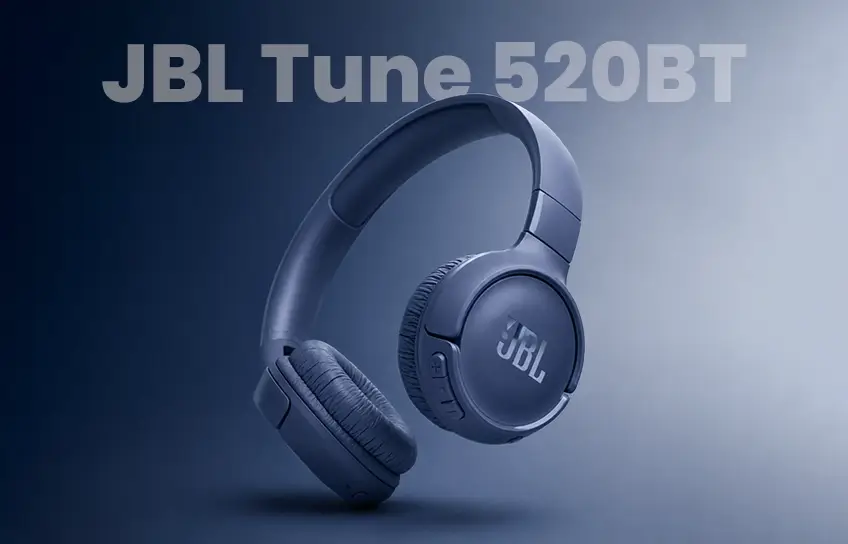
I have bought more cheap headphones than I care to count. Most of them follow the same pattern. They work fine for a few weeks, then something gives. A driver goes quiet on one side, the headband develops a crack, or the battery starts dying after two hours instead of the claimed twelve. You write it off as the price of going budget and move on. So when I picked up the JBL Tune 520BT for under fifty dollars, I was not expecting much.
I figured it would be decent for a few months and then join the graveyard of forgettable budget gear on my shelf. That was several weeks ago, and I have been reaching for these every morning since.
Here is everything I noticed after living with them. What actually impressed me, what genuinely annoyed me, and who should skip them entirely. For a wider look at where these sit in the budget headphone landscape, our full headphones review covers the broader category.
JBL Tune 520BT Specifications
| Specification | Details |
| Type | On-Ear, Closed-Back |
| Driver Size | 33mm |
| Frequency Response | 20Hz to 20kHz |
| Impedance | 30 Ohms |
| Sensitivity | 102 dB |
| Bluetooth Version | 5.3 |
| Codecs Supported | SBC, AAC |
| Battery Life | Up to 57 hours |
| Fast Charging | 5 minutes = 3 hours playback |
| Full Charge Time | Approximately 2 hours |
| Charging Port | USB-C |
| Weight | 157 grams |
| Multipoint Connection | Yes, 2 devices |
| ANC | No |
| Microphone | Yes, built-in |
| Voice Aware | Yes |
| App Support | JBL Headphones App, iOS and Android |
| Colors Available | Black, Blue, Purple, White |
| Wireless Range | Up to 10 meters |
| Water Resistance | None |
First Impressions Out of the Box

The box is straightforward. You get the headphones, a short USB-A to USB-C charging cable, and a quick start guide. No carrying case, which is a minor miss. I keep mine loosely folded in a side pocket of my backpack and they survive fine, but a pouch would have been a nice touch at this price.
Picking them up for the first time, the weight is the first thing that registers. At 157 grams, these are noticeably lighter than most wireless headphones I have tried. My phone weighs more. The all-plastic build is obvious and I am not going to pretend it feels premium, but it does not feel flimsy either. The hinges are solid, the headband clicks through its adjustments cleanly, and nothing creaks when you flex the frame.
The fold-flat design works well in practice. Both ear cups rotate inward so the whole thing collapses down to a size that genuinely fits in a jacket pocket. The four color options, black, blue, purple, and white, give it more personality than most budget headphones bother with. I went with black because I always go with black, but the blue looks sharp in person.
Comfort Over a Long Day

Quick note for first-time on-ear buyers: on-ear headphones rest directly on top of your ears, while over-ear headphones wrap around them entirely. The distinction matters because on-ear designs press against the ear rather than surrounding it, which creates more pressure during longer sessions.
I wore the Tune 520BT for a full workday on my first session with them. The first hour was genuinely comfortable. The ear pads are soft enough, the headband sits lightly on the top of the head, and nothing felt tight at the start. Around the ninety-minute mark I started noticing the clamping force. Not painful, but present. By the three-hour point I was taking them off for a few minutes just to give my ears a break.
This is not unique to the Tune 520BT. It is just the reality of on-ear headphones, and it affects people differently depending on ear shape and sensitivity. If you already wear on-ear headphones regularly, you will adapt to these quickly. If you have only ever used earbuds or over-ear headphones, the pressure takes some getting used to. For commutes, study sessions, work calls, and shorter listening blocks, these are comfortable without issue. A full afternoon of uninterrupted listening is where some people will start to notice them.
How They Sound

JBL leans hard into what they call Pure Bass sound across their product line, and the Tune 520BT carries that same character. The low end is pushed forward noticeably compared to a flat or neutral tuning. When I put on a hip-hop track the first morning, the kick drums had more weight than I expected from something at this price. The basslines stay defined without getting muddy at normal listening volumes, which is harder to pull off than it sounds.
I listened through a pretty wide range of music over the testing period. Pop and electronic tracks sound lively and energetic. Podcasts and spoken word content are clear, with vocals sitting comfortably in the mix. Older soul records actually benefit from the extra low-end warmth. Marvin Gaye’s “What’s Going On” had a fullness to it that thinner headphones tend to strip away.
Where the tuning starts to work against the music is in anything that relies on midrange detail or treble clarity. Acoustic guitar, classical strings, jazz piano, these genres get a little buried under the boosted low end. Certain pop tracks with dense layering also lose some vocal presence when the bass shelf is this prominent. It is not unpleasant, just coloured, and if you mostly listen to bass-heavy music it will never bother you.
The treble sits slightly rolled off, which I actually appreciated during longer sessions. Some budget headphones compensate for a boring midrange by cranking the highs, and you end up with that brittle, fatiguing sound after an hour. The Tune 520BT avoids that. Listening for two hours straight never made my ears tired.
The free JBL Headphones app gives you EQ presets and a manual curve editor. Pulling the bass back a couple of notches through the app does open up the mids meaningfully if you want a more balanced sound. It is worth spending five minutes with the app when you first set these up.
Battery Life

This is where the Tune 520BT earns its reputation. JBL rates it at 57 hours, and after running it through a full week of daily use averaging six to seven hours a day, I charged it once. One charge for the entire week, with battery left over when I plugged it in.
At some point during that stretch I genuinely forgot these needed charging at all. That is the best thing you can say about a wireless device. You stop thinking about battery management entirely.
The fast charge feature is not something I expected to use much given the battery life, but I tested it anyway. Five minutes plugged in, then unplugged and back to listening. The playback that followed covered a full commute with time to spare. It works exactly as advertised, which is not always guaranteed at this price.
One thing that caught me off guard was the position of the USB-C charging port. It sits on the top of the right ear cup rather than the bottom or back edge where most headphones place it. That means when you plug in the cable, it sticks straight up out of the headset. You cannot comfortably wear them while charging. The cable gets in the way immediately. With a 57-hour battery this will rarely be a problem in real life, but the first time I went to charge-and-listen on a low battery morning, I discovered it the hard way.
Connectivity and Daily Use

Pairing on Android was instant through Google Fast Pair. The prompt appeared on my phone before I had even finished turning the headphones on. iOS pairing requires the JBL Headphones app to be installed first, which is an unusual requirement. Most Bluetooth headphones pair through the system settings without needing a dedicated app upfront. It took me a few minutes to figure out why the pairing was not completed, and checking the manual clarified the app install step. Once that is done, subsequent connections are automatic.
The Multipoint feature, staying connected to two devices at the same time, works better than I expected. I kept these paired to my laptop and my phone throughout the week. When a Slack call started on the laptop, the audio switched over cleanly. When a phone call came in, I could answer it without touching any settings. The handoff between devices is not instant but it is fast enough that it never felt clunky in real use.
All controls sit on the right ear cup. Single press plays and pauses, double press skips forward, triple press goes back, long press calls up the voice assistant. The volume rocker is above the multifunction button. Everything is chunky enough to find by touch without looking, which matters more than you think when the headphones are on and your hands are occupied.
How Well Do They Block Outside Noise?

The Tune 520BT does not have active noise cancellation. What it has is passive isolation, meaning the physical cups pressing against your ears block some ambient sound naturally. In a quiet room or a calm indoor environment, that is enough. You can focus on what you are listening to without distraction.
On the street, the isolation holds up reasonably well against traffic hum and wind at low speeds. Step onto a busy train or a loud bus and a significant amount of that background noise comes through. Turning the volume up compensates but pushes the sound in a direction that does not flatter these headphones. In genuinely noisy environments, passive isolation has real limits that no amount of good tuning can overcome.
This is not a criticism of the Tune 520BT specifically. It is a characteristic of the on-ear category at this price. If noise cancellation is a priority for your commute or work environment, this headphone is not the right tool regardless of how good everything else about it is.
Call Quality

The built-in microphone handles everyday calls without causing problems. People on the other end hear me clearly in a quiet room, and the Voice Aware feature, which pipes a small amount of your own voice back through the headphones while you are speaking, makes conversations feel natural rather than muffled. I used these for video meetings throughout the testing week and never had anyone ask me to repeat myself or complain about the audio.
Outdoors is a different story. Wind creates audible artifacts on my voice and busy street noise competes with the microphone pickup. For walking-and-talking scenarios, it is functional but not ideal. For home calls, remote work, and online classes, it does the job without any issues.
JBL Tune 520BT vs Sony WH-CH520 vs Soundcore Q20i
If you are deciding between these three at a similar price, here is the honest breakdown.
| Feature | JBL Tune 520BT | Sony WH-CH520 | Soundcore Q20i |
| Price | ~$49.99 | ~$49.99 to $59.99 | ~$39.99 to $49.99 |
| Headphone Type | On-ear | On-ear | Over-ear |
| Battery Life | 57 hours | 50 hours | 60 hours |
| Bluetooth Version | 5.3 | 5.2 | 5.0 |
| Codecs | SBC, AAC | SBC, AAC | SBC, AAC |
| ANC | No | No | Yes, Hybrid ANC |
| Multipoint | Yes | Yes | Yes |
| Weight | 157g | 147g | 238g |
| Foldable | Yes | Yes | No |
| Water Resistance | None | None | None |
| App Required to Pair | Yes, mobile | Optional | Optional |
The Sony WH-CH520 is the closest comparison. Same price bracket, same on-ear design, same codec support. Sony’s sound tuning is more balanced and less bass-heavy, which suits listeners who find the JBL low-end too prominent. The JBL has a longer battery and a newer Bluetooth version. Sony’s clamping force is lighter, making it the more comfortable option for very long sessions. For most casual listeners, the choice comes down to whether you prefer bass-forward or neutral sound.
The Soundcore Q20i is a different kind of competitor. It is over-ear rather than on-ear, heavier at 238g, and not foldable. What it offers that neither JBL nor Sony can match at this price is active noise cancellation. If your primary use case involves loud environments, the Q20i’s ANC advantage is hard to argue with regardless of the weight trade-off. For more options in the budget ANC space, our JLab headphones review covers several alternatives worth knowing.
Who These Are Right For
These work best for students, daily commuters, and remote workers who want wireless headphones that last all week, sound better than their price suggests, and stay out of the way. If you switch between a phone and a laptop throughout the day, the Multipoint connection makes that genuinely seamless. The foldable design means these live in a bag and come out when needed without any ceremony.
They are probably not the right choice if you spend a lot of time on loud public transit or in noisy coffee shops and need background noise to disappear. The passive isolation is not enough for those environments and the lack of ANC is a real limitation. They also do not suit people who want to wear headphones for four or five hours in a single stretch without removing them. The clamping force becomes noticeable well before that.
For gym use, I would be cautious. There is no sweat or water resistance rating, so heavy workout sessions carry some long-term risk. Light activity like walking or casual lifting is probably fine, but these were not designed with fitness use as a priority.
If noise cancellation is what you need inside the JBL family, the JBL Tour Pro 2 is worth considering as a step up. For JBL’s current top-tier wireless experience, the JBL Tour Pro 3 sits at the other end of the price spectrum but represents a meaningful upgrade in every category.
Pros and Cons
| Pros | Cons |
|---|---|
| Battery life is exceptional for the price, a full week of daily use on one charge | No active noise cancellation limits usefulness in loud environments |
| Fast charge delivers three hours of playback after five minutes plugged in | Clamping force builds up during very long sessions |
| Multipoint connection between two devices works reliably in real use | USB-C port on top of the ear cup means no charge-and-listen |
| Foldable and light enough to live in a bag without thinking about it | App install required before first pairing on iOS and Android |
| JBL app EQ gives useful control over the bass-heavy default tuning | No water resistance rating despite the gym-friendly price point |
| Bluetooth 5.3 connection was stable throughout testing with no drops | No wired listening option if the battery does somehow run out |
Final Thoughts
Finding a budget headphone that does not disappoint you within a month is genuinely harder than it should be. Most options at this price either sound hollow, feel cheap in a way that wears thin quickly, or come with features that technically exist but do not work well enough to matter.
The JBL Tune 520BT does not have that problem. It sounds better than its price suggests, the battery is the best I have seen at this price point, and the build is solid enough that I have no concerns about it lasting. After several weeks of daily use, I still reach for these by default.
The trade-offs are real. No noise cancellation, firm clamping force during long sessions, and a charging port in an awkward spot. If any of those are dealbreakers for your situation, they are worth taking seriously. But for casual listeners, students, and remote workers who want wireless headphones that just work every day without demanding attention, the Tune 520BT earns its spot at the top of the budget list.
